---
title: Setting up driving directions
description: driving directions
---
[Skip to content](https://info.agencyassassin.com/knowledge-base/setting-up-driving-directions#main-content)
English - United States
Show submenu for translations

Open main navigation
Close main navigation
- English - United States
Show submenu for translations
How Agency Assassin can help you?
- There are no suggestions because the search field is empty.
1. [Agency Assassin Knowledge Base](https://info.agencyassassin.com/knowledge-base?hsLang=en-us)
2. [Campaigns](https://info.agencyassassin.com/knowledge-base/campaigns?hsLang=en-us)
August 18, 2025
# Setting up driving directions
When planning your campaigns, take advantage of our Driving directions functionality.
Driving directions feature is a safe way to boost your campaign performance, if your business is a Local business with a physical address.
To take advantage of this functionality, navigate to the campaign keywords section and enable the control for the proper keyword category. We recommend using it for money keywords.
Typically, we do a large search area (20 miles or more) as ranking is not a factor in these. We pick up to 40 landmarks of each type in a that large area.
We are usually selecting ‘All items’, but feel free to experiment.
Here we are selecting to find 40 landmarks of each type.
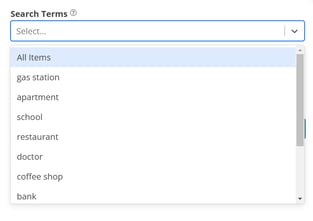
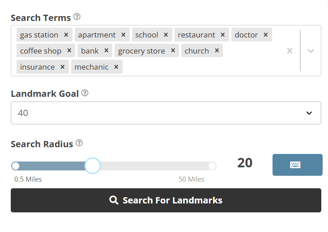
You can also type other search terms for landmarks for driving directions. Such as related industries or competing businesses.
Try it out for your campaigns!
And we're here to support you every step of the way. If you have any questions or need further assistance, please don't hesitate to contact our support team.
- [Campaigns](https://info.agencyassassin.com/knowledge-base/campaigns?hsLang=en-us)
- [Keywords](https://info.agencyassassin.com/knowledge-base/keywords?hsLang=en-us)
- [Traffic](https://info.agencyassassin.com/knowledge-base/traffic?hsLang=en-us)
- [Reviews](https://info.agencyassassin.com/knowledge-base/reviews?hsLang=en-us)
- [Google](https://info.agencyassassin.com/knowledge-base/google?hsLang=en-us)
- [Contact](https://info.agencyassassin.com/knowledge-base/contact?hsLang=en-us)
- [Product Updates](https://info.agencyassassin.com/knowledge-base/product-updates?hsLang=en-us)
[](http://agencyassassin.com)
Denver, US
Copyright © 2024, Agency Assassin